

A social media content calendar template gives you one place to plan what you post, where it goes, and when it publishes, so you stop staring at a blank screen every morning. For a real estate agent or home-service owner already juggling calls, job sites, and client meetings, that structure is the difference between posting three times a week and posting three times a month.
At DH Digital Consulting, I build systems for business owners who are out doing the work, not sitting at a desk managing marketing. A content calendar is one of the simplest systems you can put in place this week, and it pairs well with the kind of done-for-you social content generation I offer clients once their basic systems are in order. If you want help setting one up around your actual business, I’m easy to reach at [email protected] or (469) 689-1107.
A social media content calendar template is a simple spreadsheet or planning sheet that tracks the publish date, platform, content pillar, and caption for every post you plan to share, so your team always knows what’s going out next. The format matters less than whether you actually use it every week.
Key Takeaways
- A content calendar template turns random posting into a repeatable weekly habit built around a handful of core topics.
- The right format depends on your team size: a simple spreadsheet works for solo owners, while scheduling tools add publishing and approval steps for bigger teams.
- Posting consistently on two or three platforms beats spreading thin attention across five.
What Should Go in Each Calendar Entry?
Every entry in your social media content calendar template needs six pieces of information: the publish date, the platform, the content pillar, the content type, the caption or topic, and the status. Skip any of these, and you’ll end up re-deciding details you already settled a week earlier.
The publishing schedule columns (date and time) anchor everything else. Next to that, note the platform, since a post built for Instagram rarely works unchanged on LinkedIn. The content type column tells you the format: a Reel, a carousel, a static image, or a text post. Mixing formats keeps a feed from feeling repetitive.
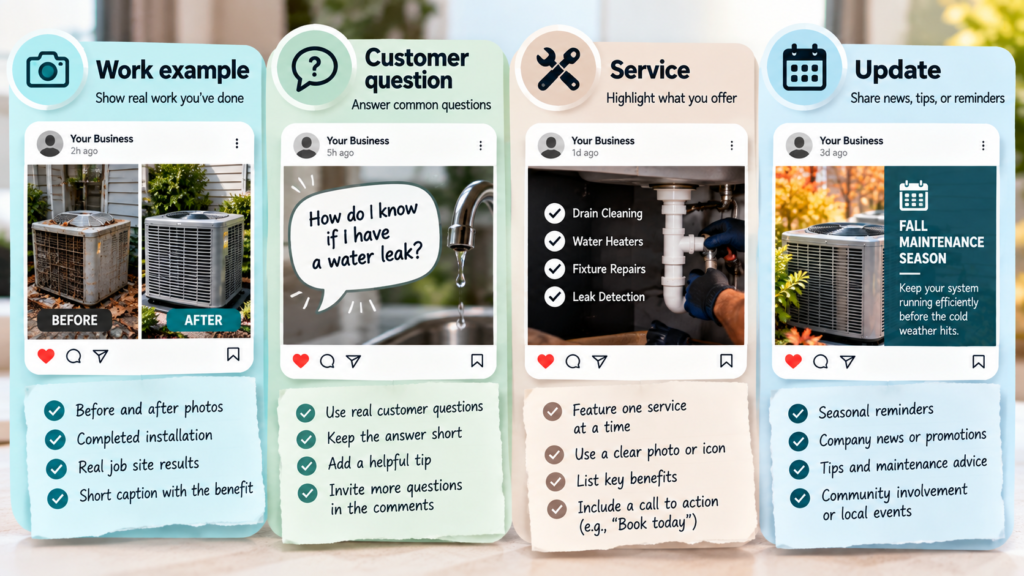
Content pillars are the three to five core topics your business consistently posts about. A real estate agent might use: new listings, market updates, client testimonials, and neighborhood guides. A home-service business might use: before-and-after jobs, maintenance tips, team spotlights, and seasonal reminders. Every post should tie back to one pillar. If it doesn’t fit, it probably doesn’t belong on the feed.
Your content ideas column holds the actual topic or hook for that slot, even in rough form. You don’t need a finished caption at the planning stage, just enough detail that whoever writes the post later knows what it’s about.
A basic content calendar template might look like this:
| Date | Platform | Pillar | Content Type | Topic/Idea | Status |
|---|---|---|---|---|---|
| Mon | Listings | Carousel | New 3-bed listing walkthrough | Drafted | |
| Wed | Testimonials | Image + quote | Client review from last closing | Scheduled | |
| Fri | Market updates | Text post | Local inventory trend | Idea |
Keep the columns consistent across weeks. That consistency is what makes the sheet useful for review later, not just for planning ahead.
How Do You Fill Out a Week of Posts?
Filling out a week of posts starts by assigning each content pillar to a specific day, then building the actual post around that day’s topic. This turns content planning from an open-ended task into a series of small, specific decisions.
A workable weekly rhythm for a solo owner or small team looks like this:
- Monday: A pillar tied to new work or new listings, since audiences tend to engage with fresh updates early in the week.
- Wednesday: A pillar built around trust, such as testimonials, reviews, or behind-the-scenes content.
- Friday: A pillar focused on value or education, like a tip, a checklist, or an answer to a common question.
Once the pillar-to-day structure is set, move into content creation. Block two to three hours once a week to write captions, gather or create visuals, and schedule everything at once. Batching this way keeps you in one mode of work instead of switching between “marketing mode” and the job that actually pays the bills.
A good rule for content strategy: aim for roughly 80 percent value-driven posts and 20 percent promotional ones. If every post asks for a sale, people tune out. If every post is helpful or interesting, the occasional promotional post gets more attention, not less.
Leave a little room in the week unplanned. If something timely comes up, a local event, a trending topic, or a client win worth sharing immediately, swap it in. The social media content calendar template should guide the week, not lock it down completely.
How Should the Plan Change by Platform?
Your plan should change by platform because each one rewards a different format, tone, and posting frequency, and treating them all the same wastes effort. A single photo that works on Instagram rarely performs the same way as a native video on TikTok.
Here’s how the core fields in your calendar should shift by network:
| Platform | Best Content Type | Typical Weekly Frequency | Tone |
|---|---|---|---|
| Image + link, community posts | 3 to 4 posts | Conversational, local | |
| Carousel, Reel, Story | 3 to 5 posts, daily Stories | Visual, polished | |
| TikTok | Short video | 3 to 5 posts | Casual, direct to camera |
| Text post, article share | 2 to 3 posts | Professional, insight-driven | |
| Vertical pin graphic | 2 to 4 pins | Evergreen, search-friendly |
These numbers are starting points, not rules. It’s better to post consistently three times a week for six months than to post daily for two weeks and quit.
Best time to post also varies by platform and by your specific audience. General data can point you in a direction, but your own audience’s activity patterns, visible in your platform’s analytics, should override generic advice once you have a few weeks of data to look at.
For a service business trying to decide where to even start, the smarter move in your broader social media strategy is picking two or three platforms where your actual customers spend time, rather than spreading thin content across five networks. A real estate agent’s audience often lives on Instagram and Facebook first; a B2B service provider often gets more traction putting real effort into LinkedIn over chasing every platform at once.
Which Format Fits Your Posting Workflow?
The format that fits your posting workflow depends on how many people touch your content and whether you need built-in publishing. A solo owner needs something different than a team of five.
A google sheets social media calendar works well for individuals or very small teams. It’s free, flexible, and easy to share with a business partner or an assistant. Columns for date, platform, pillar, caption, and status cover the basics. The tradeoff: a spreadsheet doesn’t publish posts for you, and it gets harder to manage once you’re coordinating several people’s work across many platforms.
An editorial calendar built in Notion or a similar tool adds visual boards and the ability to store captions, images, and notes in one spot. This suits owners who want more structure than a spreadsheet but aren’t ready for a paid scheduling tool.
Dedicated social media management platforms like buffer or hootsuite combine the planning calendar with actual publishing. You build the post once, and the tool pushes it live on each connected platform at the scheduled time. These tools add value once you’re managing multiple platforms regularly and want to stop logging into each app separately to post.
| Format | Best For | Publishes Posts? |
|---|---|---|
| Google Sheets | Solo owners, simple tracking | No |
| Editorial calendar (Notion-style) | Small teams wanting more structure | No |
| Buffer or Hootsuite | Teams managing multiple platforms | Yes |
Start with whatever you’ll actually keep using. A simple sheet you update every week beats an elaborate tool you abandon after one month.
Start with a Calendar You Can Keep Using
A content calendar works only if it fits into how you actually run your week, so the goal isn’t the fanciest template, it’s the one you’ll still be filling out in three months. Start with a basic spreadsheet, assign pillars to specific days, and batch your content creation once a week instead of scrambling daily.
This kind of system matters most for owners doing the work themselves, the agents showing houses, the contractors on job sites, the small teams without a dedicated marketing hire. Consistent posting builds the kind of visibility that brings in the next client, the same way consistent call answering keeps leads from slipping away. If you’re working in the business all day and the social media marketing side keeps falling behind, that’s exactly the kind of recurring task worth handing off. DH Digital Consulting builds custom social media content calendars and done-for-you posting schedules starting at $297 for a calendar with pre-made posts, built around your actual services and audience rather than a generic template.
Frequently Asked Questions
Is there a free social media content calendar template available?
Free content calendar templates exist in Google Sheets, Excel, Notion, and Canva formats, and most cover the basic fields of date, platform, pillar, and caption. A free template gets you started quickly, though you’ll likely want to add or remove columns once you see which fields your workflow actually needs.
What’s the difference between free content calendar templates and paid scheduling tools?
Free content calendar templates, usually spreadsheets, help you plan and organize posts but don’t publish them for you. Paid scheduling tools combine that same planning function with the ability to automatically post content live on each platform at the scheduled time.
How far in advance should I fill out my calendar?
Plan at least two to four weeks ahead so you’re not creating content last minute for things you already know are coming, like a holiday or a product launch. Leave some room each week open for timely posts or trending topics worth jumping on.
How many content pillars should a small business use?
Three to five content pillars work well for most small businesses and solo owners. Fewer than three can feel repetitive, and more than five makes it hard to keep your messaging focused.
Do I need different calendars for each social platform?
One calendar can cover every platform if it has a clear column for which network each post belongs to. Keeping everything in one place makes it easier to see gaps, like a week with nothing planned for LinkedIn, than managing separate calendars per platform.