

A weekly social media calendar built around five post types, local market updates, property listings, home tips, and a personal feature, gives real estate agents a repeatable schedule instead of a blank screen every morning. A real estate agent who assigns one post type to each weekday and batches captions once a week can maintain a social media calendar without it becoming a second job. That structure matters because agents who post on impulse tend to either repeat the same listing photo or go quiet for weeks, and both patterns cost them attention in a market where buyers check an agent’s profile before they ever call.
I work with service businesses and real estate agents at DH Digital Consulting, and the pattern shows up constantly: the agents who stay visible online are rarely the ones with the most time. They are the ones with a plan sitting in front of them before Monday starts. A social media calendar removes the guesswork of what to post and turns content into a habit instead of a chore squeezed in between showings.
If missed calls and slow follow-up are already eating into the leads your social media brings in, that is a separate but related problem worth solving alongside your posting plan.
Key Takeaways
- A five-day posting structure covering market updates, listings, education, and personal content keeps a real estate social media calendar consistent without daily guesswork.
- Batching captions and graphics once a week turns content creation into a single planning session instead of a daily scramble.
- A calendar only pays off if inquiries get a fast response, which is where most agents lose the leads their posts generate.
What Should Go in a Real Estate Posting Calendar?
A real estate social media calendar needs a mix of content themes so the feed does not read like a string of listing ads. Agents who post only new listings tend to lose followers because every post asks for something: a showing, a call, a referral. A calendar built around variety keeps the account useful to someone who is not ready to buy or sell yet but will remember the agent when they are.
The core themes that belong in a social media content calendar for real estate marketing are:
- Local market updates: price trends, inventory shifts, and what they mean for buyers or sellers in plain terms.
- Property listings: new listings, open houses, and price changes, framed with a detail that makes the home memorable.
- Educational content: answers to the questions clients actually ask, like financing basics or what an inspection contingency covers.
- Behind-the-scenes content: a day in the field, a closing, or the work that happens before a sign goes in the yard.
- Community and personal content: local business shoutouts, neighborhood events, or a short personal note that humanizes the agent.
Rotating these five themes across the week keeps the real estate social media calendar from feeling repetitive. It also gives an agent a ready answer any time they sit down to plan: check the theme for the day, then write to it.
A Weekly Posting Plan You Can Adapt
A simple five-day structure covers most of what a real estate social media content calendar needs without demanding a new idea every single day. The plan below assigns one theme per weekday, which means an agent never has to decide what to post from scratch. They only have to fill in that day’s specific detail.
Monday: Local market update. Share one stat that matters to buyers or sellers that week, like a shift in average days on market or a change in listing inventory. Keep it short and translate the number into what it means for someone trying to make a decision.
Tuesday: Property post. Feature a new listing, a price drop, or a recent sale. A single strong photo and one line about what makes the property stand out works better than a full listing description crammed into a caption.
Wednesday: Real estate education post. Answer a question clients ask often, such as what earnest money is or how to read a seller disclosure. This is where real estate tips perform well, because they solve a problem instead of asking for one.
Thursday: Home staging tips or seller-focused content. Practical advice, like which rooms to declutter first or how to photograph a small bedroom, gives sellers something they can use immediately and positions the agent as the person who knows the details that get a home sold faster.
Friday: Personal or community content. A closing celebration, a local business feature, or a short note about the week keeps the account feeling like a person rather than a listing feed. This is also a good day for a moving checklist post, since it is useful to buyers and sellers alike and tends to get saved and shared.
Agents managing a heavier posting schedule can add a sixth or seventh day for video content, but five solid days beats seven inconsistent ones.
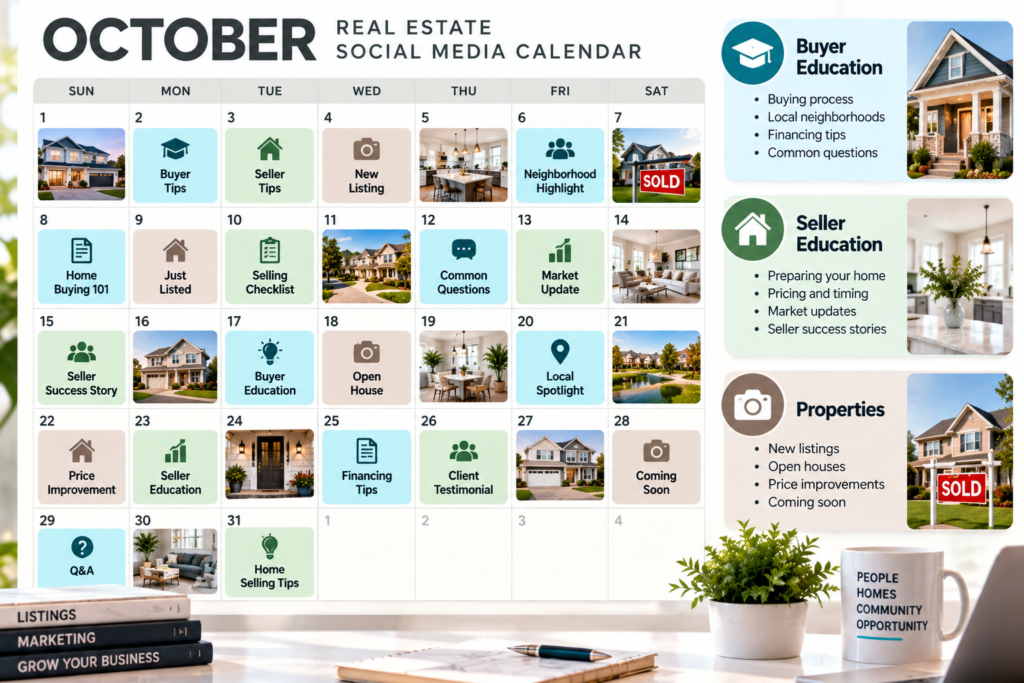
How Do You Plan and Schedule a Month of Posts?
Planning a month of content for a content calendar for real estate works best in one sitting rather than spread across daily decisions. Block two to three hours, pull up the weekly theme structure, and fill in four weeks of specific topics at once: which listings are live, what market stat applies that month, which educational question to answer, and which personal moment is worth sharing.
Writing captions in batches saves time because the agent stays in one mode of thinking instead of switching between market analysis, listing copy, and casual commentary throughout the week. A simple spreadsheet or a shared document works fine for this; the format matters less than the habit of filling it in before the month starts rather than during it.
Once the month is planned, scheduling tools let posts go out automatically on the assigned day and platform. This is where a social media strategy becomes a system instead of a list of good intentions. An agent who plans content once a month and lets it publish on schedule spends far less time thinking about social media marketing during the week, which leaves more hours for showings, client calls, and the actual transactions that pay the bills.
Review performance once a month. Note which posts got saves, comments, or direct messages, and adjust the next month’s plan toward what the audience responded to.
What Happens When a Post Brings in an Inquiry?
A social media calendar only pays off if the inquiries it generates get answered fast. An agent who posts consistently but misses the call or message that results from it has solved half the problem and left the other half on the table. Once someone comments on a listing post or sends a direct message asking about a showing, that window of interest closes quickly, and a slow reply often means the prospect moves on to another agent.
This is the same gap that shows up with missed phone calls. An agent in a showing, driving between appointments, or in the middle of paperwork cannot always catch a lead the moment it comes in, whether that lead arrives as a phone call or a comment under a listing post. The fix is building a response system that works even when the agent cannot personally answer right away, something covered in more depth in how missed calls cost service businesses and in the first five minutes of lead response.
EchoAssist, the AI receptionist built by DH Digital Consulting, handles this gap on the phone side: it answers calls around the clock, gathers caller details, and qualifies leads using questions built around a real estate agent’s own business, so a missed call does not automatically mean a missed deal. The standard plan runs $497 a month with a $397 setup fee, and the first ten agents who sign on can lock in a founding rate of $297 a month for a full year in exchange for a testimonial. A free 10-minute demo shows how the setup works for an agent’s own call-handling needs.
Start with a Calendar You Can Maintain
The agents who stay consistent on social media are the ones running a simple weekly structure, not the ones chasing a new idea every day. Five themes, one assigned to each weekday, gives an agent a repeatable system that covers local market updates, property posts, real estate tips, and the personal content that builds trust over time. Planning a month at once and batching captions turns content creation into one sitting instead of a daily scramble.
A calendar that brings in inquiries only helps if those inquiries get a fast reply. Agents who are out showing homes or busy with clients while their phone rings face the same timing problem on calls that they do with social media comments and messages. Building a response system for both sides, content and calls, keeps the leads a calendar generates from slipping away before they turn into business.
Frequently Asked Questions
How often should a real estate agent post on social media?
Three to five times a week works well for most agents, since consistency matters more than daily posting. A steady schedule with five distinct content themes keeps a feed active without demanding new material every single day.
What is the best social media platform for real estate agents?
Instagram and Facebook remain the most commonly used platforms for real estate content because they support both photos and local community engagement. LinkedIn works well for market updates and professional milestones, especially for agents building referral relationships with other professionals.
Should every post include a property listing?
No, a feed made up entirely of listings tends to lose followers because every post asks for an action. Mixing in market updates, educational tips, and personal content keeps the account useful to people who are not actively buying or selling.
How far in advance should a real estate social media calendar be planned?
Planning one month at a time works well for most agents, since it is far enough ahead to batch content but short enough to adjust for new listings or market changes. Reviewing performance at the end of each month helps shape what goes into the next one.
What should an agent do if a social media post brings in a lead?
Respond as quickly as possible, since interest from a comment or message fades the same way it does with an unanswered phone call. Agents who cannot reply instantly need a system, whether that is a notification workflow or an answering service, to make sure the inquiry does not go cold before they get back to it.