

A basic social media content calendar costs nothing if you build it yourself in a spreadsheet or a tool like Notion. Pay someone to plan, write, and manage it for you, and the range runs from about $300 a month for light template-based work up to $5,000 or more a month for full-service management across several platforms. The number that fits your business depends on how much of the planning, writing, and posting you want off your plate.
For most small service businesses, a realistic monthly budget for a managed social media content calendar falls between $500 and $3,000, covering content planning, custom content creation, and scheduling across two to four platforms. Go lower than that and you are likely paying for a template with your logo dropped in. Go higher and you are paying for a bigger team, more platforms, or paid ad management layered on top.
I built DH Digital Consulting around the same problem a lot of service business owners run into with their phones: they are out doing the work that pays the bills, and the marketing tasks that could bring in more business pile up in the background. Social media content generation is one of the upsells we offer once a business is set up with EchoAssist, our AI receptionist, starting at $297 for a custom calendar with pre-made posts. If you want to see what a realistic monthly number looks like for your situation before you commit to anything, the breakdown below should get you there.
Key Takeaways
- A monthly budget of $500 to $3,000 covers planning, custom content, and scheduling for most small businesses.
- The price swings based on how many platforms you run, how custom the content is, and whether you need approval workflows or team collaboration.
- Free templates and low-cost tools work fine if you have the time; paying for done-for-you content makes sense if you don’t.
How Much Should You Budget for a Social Media Calendar?
Budget $500 to $3,000 a month if you want a social media content calendar that includes planning, writing, and scheduling handled for you. Social media management pricing scales with how much of the work is custom versus templated, and how many platforms are in play.
At the low end, $500 to $1,500 a month typically buys two platforms, a dozen or so posts, and content built from pre-designed templates rather than original creative. This covers social media management costs for a business that wants consistent posting without heavy strategy behind it. At $1,500 to $3,000, you start seeing custom graphics, a real content planning process, and more active replies to comments and messages. Above $3,000, you are paying for full-service work: more platforms, short-form video editing, and reporting tied to business results, not just likes and follows.
If you’re handling it yourself, your main cost is time, not dollars. A free template and a few hours a week can get a basic calendar running. Once you add more platforms, more content formats, or a faster response time to comments and messages, social media marketing costs climb because someone has to do that work, whether that’s you, a freelancer, or an agency.
The honest starting point for most solo operators and small teams is the $500 to $1,500 tier. It gets your content planned and published consistently without eating your whole week, and you can scale up once you see what the extra platforms or custom content are actually worth to your business.
What Changes the Price?
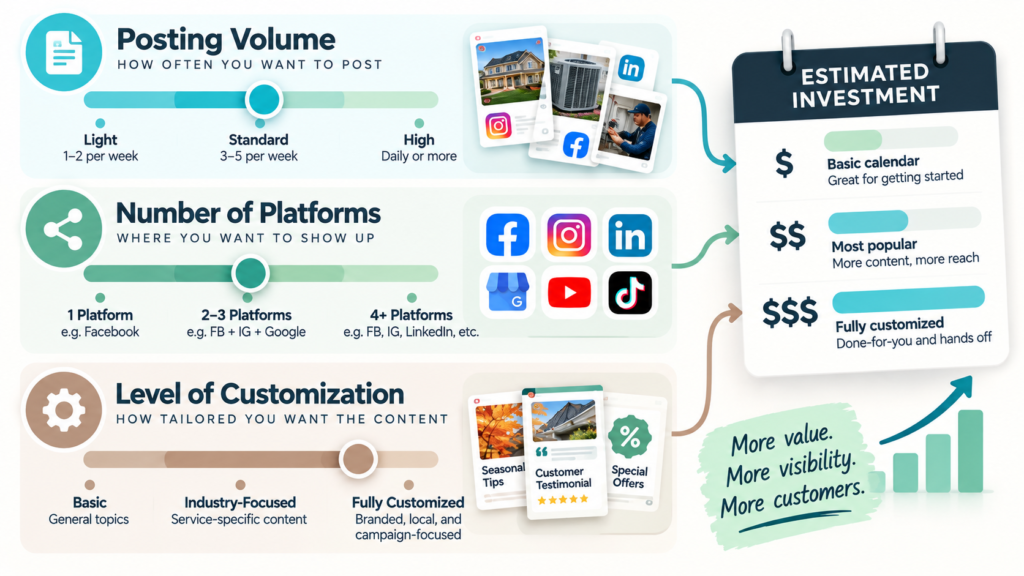
The number of platforms, how custom the content is, and how many people touch each post before it publishes are the three biggest price drivers. Everything else is a variation on those three.
Number of platforms. Managing Facebook and Instagram together usually runs less than adding a third or fourth network, since each platform needs its own content planning, formats, and posting schedule. TikTok and short-form video in particular take more labor because editing eats time that a static image post doesn’t.
Custom content creation versus templates. A calendar built from pre-designed templates costs far less than one with original graphics, photography, or video shot specifically for your brand. Custom content creation is the single biggest swing factor in price, since it is where most of the actual labor hours go.
Approval workflows and team collaboration. A solo operator approving their own posts needs almost no process. A business with a manager, an owner, and sometimes legal reviewing content before it goes live needs built-in approval workflows, and that extra coordination adds cost whether you are paying a freelancer by the hour or an agency a flat retainer.
Posting volume and strategy depth. More posts per month means more writing and design hours. A deeper social media strategy, one with defined content pillars, campaign tie-ins, and a testing plan, costs more than a calendar that just fills a posting slot every day.
If you’re already managing a full plate of jobs, calls, and customers, the business owners I talk with usually tell me they are working in the business, not on the business, and social media is the first thing that falls off the list. That’s the gap a priced content calendar is meant to close.
What Is Included in the Price?
A standard social media calendar package covers planning, content creation, scheduling, and basic reporting. What’s included above that baseline depends entirely on the tier you’re paying for.
At minimum, expect:
- Social media scheduling and publishing: posts queued and published on time across your chosen platforms.
- Content planning: a monthly or quarterly view of what’s going out and why.
- Basic social media analytics: reach, engagement, and follower change reported monthly.
Mid-tier packages add a social inbox for managing comments and direct messages in one place, along with more active community management, meaning faster replies and more proactive monitoring of what people are saying about your brand. You’ll also typically see a dedicated point of contact instead of a rotating team.
What’s usually billed separately, no matter the tier: social media advertising campaigns (the ad spend itself, not just the management fee), influencer marketing, and professional photography or video shoots. If a quote mentions “paid social” as included, it is worth asking directly whether that covers the management of the ads or the actual ad budget, because those are two very different numbers.
Setup or onboarding fees are common too, often a separate one-time charge before the monthly work begins. Ask what that setup fee covers so you know whether it is strategy development, account audits, or just connecting your accounts to a tool.
Should You Use a Template, Pay for a Tool, or Hire Someone?
Use a free template if you have the time to plan and write your own posts; pay for a tool if you need scheduling and basic analytics without the labor of a person doing it for you; hire someone if you want the planning, writing, and posting done without your involvement.
A social media content calendar template, whether in a spreadsheet, Notion, or Trello, costs nothing and works well for a solo operator posting on one or two platforms. The tradeoff is that nobody is writing the captions or designing the graphics for you. You still have to sit down and do the work; the template just organizes it.
Content calendar tools step up from there. Social media management tools like Buffer, Later, Planable, CoSchedule, Hootsuite, Sprout Social, SocialBee, and SocialPilot range widely in price, with several offering entry plans well under $100 a month and more advanced plans running higher as you add users, platforms, or analytics depth. These tools handle scheduling and give you a shared calendar view, but most don’t write your captions or design your graphics. You’re paying for organization and automation, not content.
| Option | Monthly Cost | What You Still Do Yourself |
|---|---|---|
| Free template (Notion, Trello) | $0 | Plan, write, design, post |
| Content calendar software | ~$15 to $100+ | Plan, write, design |
| Done-for-you service | $297 to $3,000+ | Approve the content |
Hiring a person or service closes that last gap. If writing captions and designing graphics every week is the part you dread or keep skipping, paying for social media content generation solves the actual bottleneck instead of just organizing around it.
Choose a Calendar That Fits the Work You Need Done
The right choice comes down to what you’re actually trying to offload: the organizing, the writing, or both. A template fixes disorganization. A tool adds automation on top of that. A done-for-you service takes the writing and design off your desk entirely.
Most of the small business owners and real estate agents I talk with aren’t short on ideas for what to post. They’re short on the hours to turn those ideas into finished posts between showings, service calls, and everything else that actually earns them money that day. Social media management built around your actual services and voice solves a different problem than a scheduling tool does, and it’s worth being honest with yourself about which one you’re facing.
If social media campaigns are part of a bigger plan to generate and convert leads, it helps to look at the whole chain, not just the calendar. A missed call or a slow follow-up can undo the work a good post just did to get someone interested in the first place. That’s part of why EchoAssist and social media content generation sit under the same roof at DH Digital Consulting: the leads your posts generate still need someone, or something, to answer the phone when they call.
Frequently Asked Questions
How much does a social media content calendar cost per month?
A done-for-you social media content calendar typically costs $500 to $3,000 a month for a small business, depending on the number of platforms and how custom the content is. Free templates cost nothing but require you to do the planning and writing yourself. Tool subscriptions for scheduling and analytics usually fall between $15 and a few hundred dollars a month.
Is a free social media calendar template good enough for a small business?
A free template works well if you’re posting on one or two platforms and have the time to plan and write your own content each week. It won’t help with the actual writing, design, or scheduling automation, so the time cost shifts to you instead of your wallet. Once you add more platforms or need faster turnaround, a paid tool or service usually makes more sense.
What’s the difference between a content calendar tool and hiring someone to manage it?
A content calendar tool like Buffer, Later, or Hootsuite handles scheduling and reporting but doesn’t write your captions or design your graphics. Hiring someone, whether a freelancer or a service, takes the planning, writing, and posting off your plate entirely. The tool costs less upfront but requires your time; the hired service costs more but requires your approval, not your labor.
Does the price include paid advertising on social media?
No, standard social media calendar and management pricing almost never includes the actual ad spend for social media advertising campaigns. The monthly fee typically covers organic content planning and posting; ad management, if offered, is usually billed as a separate line item on top of your ad budget.
How many platforms should a small business manage on one calendar?
Most small businesses get the best return starting with two platforms where their customers actually spend time, often Facebook and Instagram together. Adding a third or fourth platform, especially one that requires video like TikTok, increases both the planning complexity and the cost. Start narrow, see what performs, and expand from there.