

A working social media content calendar for a real estate agent or home-service business owner looks like a simple week-by-week map, usually built in a Google Sheets social media calendar or a free content calendar template, that assigns one clear job to each platform instead of posting the same update everywhere. The strongest working examples split posts across three to five content pillars (education, behind-the-scenes, social proof, offers, and community), rotate formats so one platform never carries the full load, and leave open slots for reactive content. That structure is what separates a calendar that gets used from one that gets abandoned after two weeks.
I work with real estate agents and home-service owners who are out doing the job all day, not sitting at a desk managing content. For that audience, the calendar has to survive a busy Tuesday without falling apart. At DH Digital Consulting, the same philosophy that shapes EchoAssist, building systems around how a business actually runs, applies here: a content calendar only works if it matches your real schedule, not an idealized one.
Key Takeaways
- A working content calendar assigns specific content pillars and formats to each platform instead of repeating one post everywhere.
- Every calendar entry needs a publish date, platform, format, caption status, and owner to avoid last-minute scrambling.
- The best format, whether a spreadsheet or a scheduling tool, is the one you’ll still be updating in month three.
What Does a Working Week of Posts Look Like?
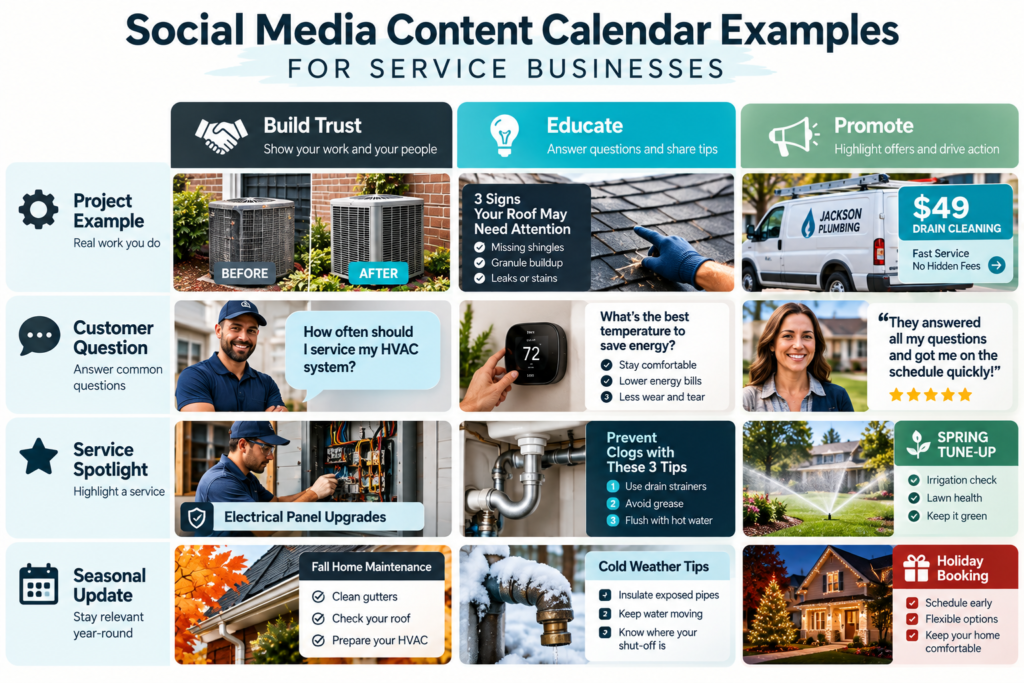
A working week pairs each platform with a job and a format, rather than posting the same message everywhere on the same day. Real estate agents and home-service businesses tend to get the most traction from a rotation like this, built around three or four content pillars pulled straight from the business.
Monday: LinkedIn post built around a content pillar like market updates or completed jobs. Professional tone, no hard sell.
Tuesday: Instagram carousel or Reel showing a before-and-after, a walkthrough, or a quick tip tied to the target audience’s actual questions.
Wednesday: Facebook post featuring a review, a referral, or a community update. Facebook audiences respond well to personal, local content.
Thursday: Instagram Story or quick video answering one common customer question.
Friday: A lighter post, a team moment or a weekend update, that humanizes the brand without selling anything.
That’s five posts built from four or five content ideas, not five separate ideas invented from scratch. The structure matters more than the exact day. A plumbing company might swap Monday’s market update for a seasonal maintenance reminder, and a solo agent might drop Friday entirely and focus harder on Tuesday and Wednesday. The point is repeatability: once this week works, next week reuses the same skeleton with fresh content dropped in.
Content pillars keep this from becoming random. Pick three to five themes tied to what the business actually offers and what the audience actually asks about, then rotate through them instead of guessing fresh each week.
What Should Each Calendar Entry Include?
Each entry needs enough detail that anyone on the team can see exactly what’s going out without asking a follow-up question. A social media calendar template built around these fields prevents the most common failure point: a post that’s half-finished when the publishing schedule says it should go live.
At minimum, every entry should track:
- Publish date and time: when the post goes live.
- Platform: where it’s going.
- Format: Reel, carousel, static image, Story, text post.
- Caption: final approved copy, not a placeholder.
- Creative asset: the actual image or video file, linked and ready.
- Content pillar or campaign: which theme or marketing campaign the post supports.
- Status: draft, in review, approved, scheduled, or published.
- Owner: who’s responsible for getting it out the door.
Solo operators can run a lighter version of this list and still get the benefit. The status field alone solves most of the chaos, since it answers “is this actually ready?” without a text message back and forth.
For teams of two or more, approval workflows become worth building into the entry itself. A quick approval note field, even a one-line “approved by Sarah, 10/3,” keeps content creation moving without a separate thread for every post. This also protects quality: a rushed caption or a mismatched photo gets caught before it publishes rather than after.
How Do You Plan a Month Without Creating Every Post From Scratch?
Plan a month without starting from zero by running a short social media audit first, then building each week from a repeatable content pillar rotation instead of inventing new ideas daily. This is the core move behind effective content planning: most of the work happens once, at the start of the month, not fresh every morning.
Start with a social media audit. Look at the last two or three months of posts and flag what got the most comments, saves, or calls. That short list becomes the seed for repurposing, turning one strong post into three or four variations across formats.
Social listening adds the second layer. Pay attention to the questions prospects actually ask, in comments, in texts, at the kitchen table during a sales call, and bank those as content ideas. This is where content strategy and social media strategy connect directly to real conversations instead of generic topic lists.
From there, campaign planning fills in the calendar’s backbone. If a listing is launching or a seasonal service push is coming, block those dates first, then fill the gaps between campaigns with pillar content. This order matters: campaigns anchor the month, pillar posts fill the rest.
Content repurposing does the heaviest lifting for solo operators. A single client testimonial can become a LinkedIn post, an Instagram caption, and a Facebook review share without rewriting from scratch each time. Agents juggling the pull between working in the business and working on it benefit most from this approach, since it cuts content creation time without cutting content volume. For agents weighing where social content fits against other lead sources, the gap between posting content and turning it into actual conversations is worth examining directly.
Which Calendar Format Fits Your Work?
The right calendar format depends on team size and how many platforms are in play, and three formats cover almost every real estate agent or home-service business: a Google Sheets social media calendar, a free content calendar template in a tool like Canva, or a dedicated platform like Hootsuite or Sprout Social.
A Google Sheets social media calendar works well for solo operators and small teams. It costs nothing, it’s easy to share, and it handles the core fields, date, platform, format, caption, status, without extra setup. Several free social media calendar templates are also built specifically as a free content calendar template for Instagram, Facebook, LinkedIn, and TikTok, pre-filled with cadence and content pillar prompts.
An editorial calendar template suits businesses running blog content alongside social, since it maps content across channels rather than one platform at a time.
Dedicated tools like Hootsuite and Sprout Social add scheduling, analytics, and approval workflows on top of the planning layer. They’re worth the cost once a business is managing several platforms, including Pinterest, TikTok, Threads, or X, with more than one person touching the content.
| Format | Best for | Cost |
|---|---|---|
| Google Sheets calendar | Solo operators, 1-2 platforms | Free |
| Free content calendar template | Quick setup, pre-filled structure | Free |
| Hootsuite or Sprout Social | Multi-platform teams needing scheduling and analytics | Paid |
Pick based on current volume, not future ambition. A spreadsheet that gets updated every week beats a paid tool that sits half-configured.
Choose a Schedule You Can Actually Maintain
The best posting schedule is the one that survives a busy month, not the one that looks most aggressive on paper. Research from Hootsuite points to recommended minimums like three to five posts a week on Instagram and TikTok, one to two times a day on Facebook, and three to five times a week on LinkedIn, but a real estate agent showing houses six days a week cannot sustain daily posting without burning out.
Start with a cadence that fits actual bandwidth: two LinkedIn posts, three Instagram posts, and one Facebook post a week is realistic for most solo agents and still builds consistency. Content mix frameworks like the 5-3-2 rule, five curated posts, three original, two personal, help keep that lighter schedule balanced instead of all-promotional.
Consistency beats volume. A calendar with three solid posts a week, maintained for six months, outperforms a daily posting goal abandoned after three weeks. Build in buffer days for reactive content, a client closing, a seasonal weather event, a trending local story, so the calendar flexes without falling apart.
For business owners managing a calendar on top of actual client work, the same tension that drives missed phone calls shows up here: the hands-on work that earns money is the same thing that makes consistent posting hard. If missed calls are also costing leads while attention goes toward content, it’s worth looking at what else in the business could run without requiring a live person on it.
Frequently Asked Questions
How far in advance should I plan my social media content calendar?
A month is the sweet spot for most solo operators and small teams: far enough ahead to batch content creation, close enough to stay relevant. Larger campaigns, like a product launch or a seasonal push, should get blocked on the calendar a quarter out, with weekly pillar content filling the space between.
What’s the difference between a content calendar and a posting schedule?
A content calendar maps the ideas, themes, and campaigns; a posting schedule governs the timing and cadence of when each post actually goes live. Most businesses need both, with the calendar setting the plan and the schedule handling execution.
How many content pillars should a small business use?
Three to five content pillars give enough variety without overcomplicating the plan. A home-service business might use completed jobs, maintenance tips, reviews, and team culture; a real estate agent might use listings, market updates, client stories, and local community content.
Can one person realistically run a content calendar without a team?
Yes, with a lighter version of the standard fields, usually just date, platform, format, and status. Repurposing one piece of content across platforms and leaning on a repeatable weekly structure cuts the workload significantly for solo operators.
Should every platform get the same content on the same day?
No. Each platform tends to perform better with a format suited to it, a LinkedIn post built for professional context, an Instagram carousel for visual storytelling, a Facebook post for community and reviews. Repurposing one idea into different formats works better than posting identical content everywhere.